 Arcade Nebula
Arcade Nebula
Arcade Nebula
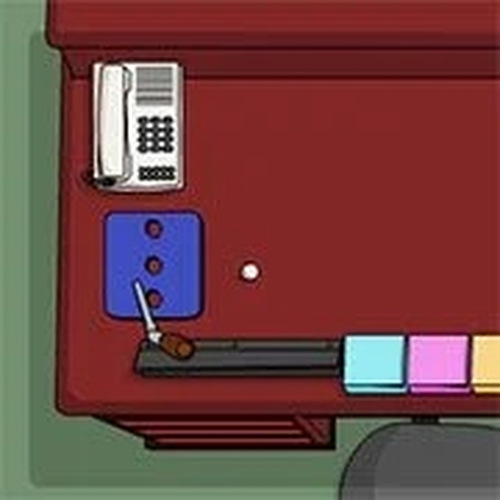
Office Mini-Golf Challenge offers a refreshing twist on classic mini golf by placing it in a vibrant office setting. The controls are intuitive, and the multiplayer mode adds friendly competition. The obstacles are cleverly designed, and the cheerful graphics make it a stress-free experience. Ideal for short breaks or family game time.
Office Mini-Golf Challenge brings the classic fun of mini golf to your computer screen. Set in a colorful office environment, this game challenges you to putt a ball through obstacles like desks, chairs, and filing cabinets. The goal is simple: get the ball into the hole with as few strokes as possible. With easy click-and-pull controls, players of all ages can start playing right away. The relaxed atmosphere and cheerful graphics make it a stress-free way to enjoy a quick game during a break or to compete with friends.
First, choose to play alone or invite up to three friends for a four-player match. Each player takes turns on the same course. Use your mouse or touch screen to click on your ball, then pull back to set the direction and power of your shot. The farther you pull, the harder you hit. Release to send the ball rolling. Watch out for office obstacles that can block or redirect your ball. The game tracks each player's score, and the player with the fewest total strokes wins. Simple to learn, but requires practice to master the angles and power.
Multiplayer support for up to four players. Simple click-and-pull controls that work on mouse and touch screens. Fun office-themed obstacles like desks, chairs, and shelves. Colorful and family-friendly graphics. Score tracking for each player. Quick rounds perfect for short breaks.
Practice your aim by experimenting with different angles and power levels. Pay attention to how the ball reacts to various obstacles, as each surface may affect its path. Use gentle shots near the hole to avoid overshooting. In multiplayer, observe opponents' shots to learn from their strategies. Take your time to line up each putt carefully for better accuracy.




Player Comments
Sign in to comment
You must be logged in before posting a review or rating.
No account? Create one
No comments yet. Be the first to comment!