 Arcade Nebula
Arcade Nebula
Arcade Nebula
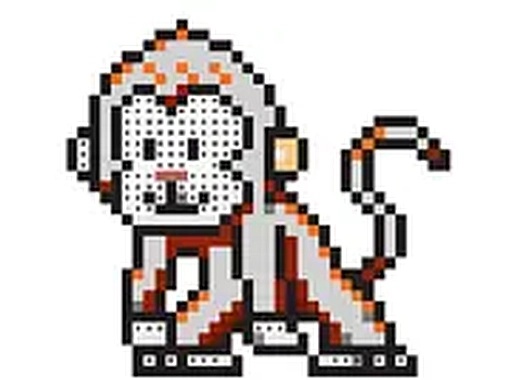
Numbered Grid Pixel Art Creator offers a genuinely relaxing puzzle experience. The logic of matching numbers to colors is straightforward, yet the gradual reveal of each image provides a steady sense of achievement. Controls are responsive on both touch and mouse devices, and the absence of timers or scores keeps the focus on creative enjoyment. The wide image library ensures lasting variety. A solid choice for anyone seeking a low-stress, creative pastime.
At its heart, this activity combines logic with artistic expression. Each grid cell carries a number that corresponds to a specific color from an on-screen palette. The challenge lies in correctly identifying which cells to fill, gradually constructing a larger image. This system encourages careful observation and patience, as each correct placement brings the hidden picture closer to completion. The numbered approach removes guesswork, allowing players to focus on the satisfying process of color placement.
Controls are designed for ease of use on both touchscreens and desktop computers. On mobile devices, players tap directly on cells to fill them, with pinch-to-zoom available for precise work in tight spaces. Desktop users can scroll to zoom and click to fill. A swipe mode allows faster filling of larger contiguous areas, reducing repetitive tapping. These options ensure a smooth experience regardless of the device being used.
The collection includes a wide range of pixel art images spanning many subjects. Players can work on pictures of animals, people, vehicles, flowers, food, and fantasy characters. This variety ensures there is something for every taste, from simple designs suitable for beginners to more complex images that require greater attention to detail. The themes are family-friendly and designed to appeal to a broad audience.
This game prioritizes a calm, pressure-free environment. There are no timers, scores, or penalties for incorrect placements. Players can work at their own pace, correcting mistakes without consequence. The gradual revelation of the final image provides a steady sense of accomplishment. Many find the repetitive filling motion meditative, making it a suitable activity for unwinding after a busy day.
New players are encouraged to begin with simpler images to learn the interface and controls. Using the zoom feature helps avoid errors in detailed sections. For larger color blocks, the swipe mode speeds up the process. Taking short breaks prevents eye strain and keeps the experience enjoyable. Experimenting with different color sequences can also make the process more engaging, as there is no single correct order to fill the grid.



Player Comments
Sign in to comment
You must be logged in before posting a review or rating.
No account? Create one
No comments yet. Be the first to comment!